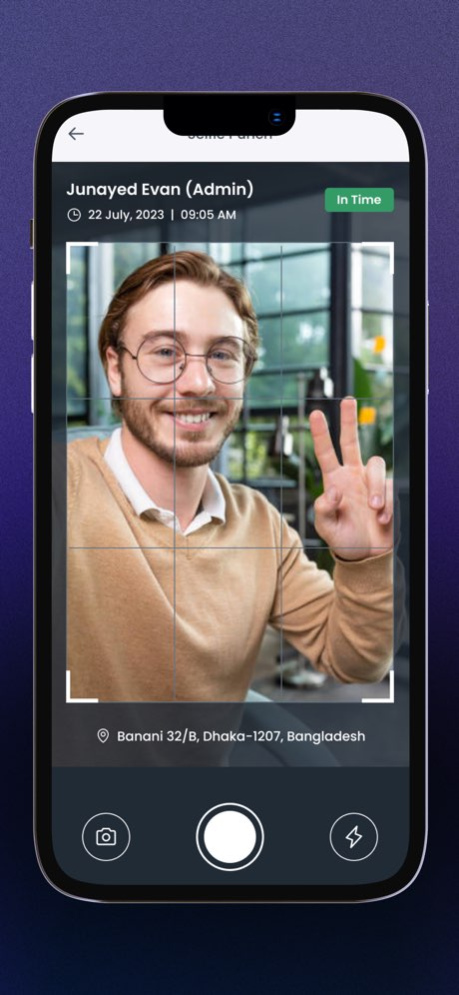
About Attnd: Attendance Tracker App
Attnd: Employee Tracking App is an all-in-one attendance tracker and employee time tracking app designed to help businesses manage employee attendance, work hours, shifts, overtime, payroll, and workforce operations from...
Attnd: Employee Tracking App is an all-in-one attendance tracker and employee time tracking app designed to help businesses manage employee attendance, work hours, shifts, overtime, payroll, and workforce operations from one place. Whether you manage an office team, construction workers, field staff, retail employees, warehouse teams, factories, restaurants, schools, healthcare workers, or remote employees, Attnd helps simplify employee attendance and time management. KEY FEATURES Attendance and Time Tracking * Employee attendance tracking * Mobile attendance * GPS attendance * Location-based attendance * Geofencing * Clock in and clock out * Employee time logs * Work hours tracking * Timesheets * Daily, weekly, monthly, and custom attendance reports * Manual attendance management Employee and Workforce Management * Employee management * Staff management * Branch management * Multiple branch support * Shift management * Work shift scheduling * Field staff management * On-site employee tracking * Remote workforce management * Workforce monitoring Payroll and Overtime * Payroll preparation * Work hours calculation * Employee overtime tracking * Automated overtime calculations * Break time calculation * Salary calculation * Payroll reports * Attendance-based payroll data * Excel and PDF reports Location and Verification * GPS-based attendance * Location verification * Geofencing * Facial recognition * Biometric verification * On-site attendance tracking WHY CHOOSE ATTND Accurate employee attendance tracking Easy work hours and overtime tracking Smart shift and branch management GPS and location-based attendance Automatic break time calculations Payroll-ready attendance reports Excel and PDF report exports Support for office, field, and remote teams Secure cloud-based workforce management Simple and easy-to-use employee tracking Attnd helps businesses reduce attendance errors, simplify payroll preparation, manage employee schedules, track working hours, and improve workforce productivity. From clock in and clock out to overtime, breaks, shifts, payroll preparation, and attendance reports, Attnd provides the tools you need to manage your workforce efficiently. Download Attnd today and simplify employee attendance, time tracking, shift management, overtime, payroll, and workforce management. Terms of Use: https://www.apple.com/legal/internet-services/itunes/dev/stdeula/
Version History What’s New in Attnd • Smoother and more consistent UI experience • Improved attendance timestamp accuracy • Better navigation and API error handling • Optimized background services and geofencing • Reduced battery usage during location tracking • Faster app startup and image loading • Improved overall stability and performance Update now for a faster, smoother, and more reliable attendance tracking experience. 8.2.1 Sep 8 • Improved Excel reports with more fields and more accurate calculations. • Added Branch Management for managing multiple branches and branch-wise shifts and reports. • Added Daily Excel Report download. • Added Daily PDF Report download. • Added automatic break time calculation. • Improved manual attendance management and the overall attendance experience. • Improved payroll and salary calculation accuracy. • Improved app performance and fixed bugs for a smoother experience. 8.2.0 Aug 11 What's New 1. Improved overall user experience for a smoother and faster app. 2. Enhanced Visit Report with better performance and usability. 3. Improved Attendance Report for more accurate and reliable tracking. 4. Added Flexible Office Time support. Employees with flexible office hours are no longer marked as late. 5. General bug fixes and performance improvements. Thank you for using Attnd! We're continuously improving the app to help you manage attendance and your workforce more efficiently. 8.1.7 Jun 29 1. Shift closed at 4AM 2. Employee and checkin show/hide preferences 8.1.6 Apr 20 Splash screen issue fixed for some devices 8.0.12 02/28/2025 1. UI Improvement 2. Minor bug fixing 8.0.11 02/11/2025 1. UI Improvement 2. Payroll module added 3. Minor bug fixing 8.0.10 11/06/2024 1. Issue Solve 2. Location issue solved 3. iOS version downgrade 4. Report issue solved 5.Document issue solved 8.0.7 06/10/2024 Issue fixing Document management Admin and employee can upload documents Admin can see and manage all employee’s files Employee can view and upload files only for themselves 8.0.6 05/04/2024 1. Missing Checkout feature 2. Missing Attendance fillup feature 3. Issue Fixing 3. Report new screen 4. Leave details Screen 5. Half-day leave apply 6. App rating option implemented 8.0.5 04/06/2024 1. Issues fixing 2. Without an internet app loading feature 3. Cards show details on click 4. Shift design 5. Shift edit, delete 6. Sign assigned to employee 7. Assigned shifts can not be deleted 8.Edit profile's new design 9. Manage employee new content 10. Solved crash issues 11. Images zoomable 12. Pending approval section API 13. Notice delete, update 14. Leave delete option 15. Report screen design 8.0.4 03/09/2024 Issue Fixing and Improvement: 1. Excel download issue fixed 2. After successfully signup redirect to dashboard 3. Selfie camera issue fixed 8.0.2 01/28/2024 Issue Fixing and Improvement: 1. Excel download issue fixed 2. After successfully signup redirect to dashboard 8.0.1 01/27/2024 We're excited to introduce the latest version of our app (Version 7.3.8), packed with enhancements to elevate your user experience. Here are the key updates: Bug Fixing: Resolved several bugs reported by users, ensuring a smoother and more reliable app performance. Such as admin and user login confusion solved. UI Improvement: Implemented a refreshed and more intuitive user interface for a visually appealing and user-friendly experience. Employee Creation Process Change: Streamlined the employee creation process to make it more efficient and user-centric. Enjoy a simplified and faster onboarding experience. Add employees with email or without email. Signup Process Update: Updated the signup process with additional security measures and a more seamless flow. Signing up is now quicker and more secure than ever. Selfie Attendance: Introducing a new feature: Selfie Attendance! Users can now clock in and out with a simple selfie, adding an extra layer of security to the attendance process. We appreciate your continued support and hope you enjoy the improved features and functionalities in this release. As always, feel free to share your feedback, and stay tuned for more exciting updates in future releases. Thank you for choosing our app! 8.0.0 12/31/2023 Minor bug fixing and redesign some screens 7.3.7 11/29/2023 Settings part design and minor bug fixing 7.3.6 11/27/2023 Minor bug fixing 7.3.5 11/09/2023 Bug Fixing - Multiple modal issue fixed - document upload issue fixed New - Notification Screen implemented - Push notification added - Report screen redesign 7.3.4 11/02/2023 New: 1. Redesign some screens Fixing: 1. App loading issue fixed 2. performance improvement 7.3.3 10/27/2023 1. Email notification on leave apply and approve leave 2. Design improvement 3. New features implemented on my panel 4. Holiday delete option added 5. Employee delete option added 7.3.2 10/03/2023 1. A new functionality for each employee's details on the admin side 2. UI design improvement 7.2.7 09/10/2023 1. Reset Password Issue Fixing 2. More subscription package added 3. UI Improvement 7.2.6 08/21/2023 1. Manage multiple admin 2. Fixing the claim and the visit for both the employee and the admin 3. Export to excel 4. Redesign the visit report, today's attendance, manage employees, drawer menus, and onboard screens. 5. Support for the Hindi language 7.2.5 08/10/2023 - Loading improvement - Multi Language added - FAQ Added - Visit Count report added in admin part - Image popup crossing issue fixed - Leave list redesign - Pending leave list added in admin my panel 7.2.4 07/30/2023 The app has been updated with the following information: Bug Fixing: Several bugs and issues reported by users have been identified and addressed. This includes resolving crashes, improving app stability, and fixing functionality-related issues. Design Related Issue Fix: The update includes fixes for design-related issues, such as alignment problems, inconsistent layouts, and visual glitches. The aim is to enhance the overall user experience and make the app visually appealing. Support Menu Added: A new support menu has been incorporated into the app. Users can now easily access support resources, FAQs, and contact information for customer assistance. This addition aims to provide better support and improve user satisfaction. These updates have been implemented to ensure a smoother and more enjoyable experience for app users. 7.2.2 06/09/2023
Previous Versions
Here you can find the changelog of Attnd: Attendance Tracker App since it was posted on our website on 2023-12-05 16:54:37.
The latest version is 8.2.1 and it was updated on 2026-10-07 00:50:48. See below the changes in each version.
Attnd: Attendance Tracker App version 8.2.1
Updated At: 2026-10-07
Changes: Version History What’s New in Attnd
• Smoother and more consistent UI experience
• Improved attendance timestamp accuracy
• Better navigation and API error handling
• Optimized background services and geofencing
• Reduced battery usage during location tracking
• Faster app startup and image loading
• Improved overall stability and performance
Update now for a faster, smoother, and more reliable attendance tracking experience. 8.2.1 Sep 8 • Improved Excel reports with more fields and more accurate calculations.
• Added Branch Management for managing multiple branches and branch-wise shifts and reports.
• Added Daily Excel Report download.
• Added Daily PDF Report download.
• Added automatic break time calculation.
• Improved manual attendance management and the overall attendance experience.
• Improved payroll and salary calculation accuracy.
• Improved app performance and fixed bugs for a smoother experience. 8.2.0 Aug 11 What's New
1. Improved overall user experience for a smoother and faster app.
2. Enhanced Visit Report with better performance and usability.
3. Improved Attendance Report for more accurate and reliable tracking.
4. Added Flexible Office Time support. Employees with flexible office hours are no longer marked as late.
5. General bug fixes and performance improvements.
Thank you for using Attnd! We're continuously improving the app to help you manage attendance and your workforce more efficiently. 8.1.7 Jun 29 1. Shift closed at 4AM
2. Employee and checkin show/hide preferences 8.1.6 Apr 20 Splash screen issue fixed for some devices 8.0.12 02/28/2025 1. UI Improvement
2. Minor bug fixing 8.0.11 02/11/2025 1. UI Improvement
2. Payroll module added
3. Minor bug fixing 8.0.10 11/06/2024 1. Issue Solve
2. Location issue solved
3. iOS version downgrade
4. Report issue solved
5.Document issue solved 8.0.7 06/10/2024 Issue fixing
Document management
Admin and employee can upload documents
Admin can see and manage all employee’s files
Employee can view and upload files only for themselves 8.0.6 05/04/2024 1. Missing Checkout feature
2. Missing Attendance fillup feature
3. Issue Fixing
3. Report new screen
4. Leave details Screen
5. Half-day leave apply
6. App rating option implemented 8.0.5 04/06/2024 1. Issues fixing
2. Without an internet app loading feature
3. Cards show details on click
4. Shift design
5. Shift edit, delete
6. Sign assigned to employee
7. Assigned shifts can not be deleted
8.Edit profile's new design
9. Manage employee new content
10. Solved crash issues
11. Images zoomable
12. Pending approval section API
13. Notice delete, update
14. Leave delete option
15. Report screen design 8.0.4 03/09/2024 Issue Fixing and Improvement:
1. Excel download issue fixed
2. After successfully signup redirect to dashboard
3. Selfie camera issue fixed 8.0.2 01/28/2024 Issue Fixing and Improvement:
1. Excel download issue fixed
2. After successfully signup redirect to dashboard 8.0.1 01/27/2024 We're excited to introduce the latest version of our app (Version 7.3.8), packed with enhancements to elevate your user experience. Here are the key updates:
Bug Fixing:
Resolved several bugs reported by users, ensuring a smoother and more reliable app performance. Such as admin and user login confusion solved.
UI Improvement:
Implemented a refreshed and more intuitive user interface for a visually appealing and user-friendly experience.
Employee Creation Process Change:
Streamlined the employee creation process to make it more efficient and user-centric. Enjoy a simplified and faster onboarding experience. Add employees with email or without email.
Signup Process Update:
Updated the signup process with additional security measures and a more seamless flow. Signing up is now quicker and more secure than ever.
Selfie Attendance:
Introducing a new feature: Selfie Attendance! Users can now clock in and out with a simple selfie, adding an extra layer of security to the attendance process.
We appreciate your continued support and hope you enjoy the improved features and functionalities in this release. As always, feel free to share your feedback, and stay tuned for more exciting updates in future releases.
Thank you for choosing our app! 8.0.0 12/31/2023 Minor bug fixing and redesign some screens 7.3.7 11/29/2023 Settings part design and minor bug fixing 7.3.6 11/27/2023 Minor bug fixing 7.3.5 11/09/2023 Bug Fixing
- Multiple modal issue fixed
- document upload issue fixed
New
- Notification Screen implemented
- Push notification added
- Report screen redesign 7.3.4 11/02/2023 New:
1. Redesign some screens
Fixing:
1. App loading issue fixed
2. performance improvement 7.3.3 10/27/2023 1. Email notification on leave apply and approve leave
2. Design improvement
3. New features implemented on my panel
4. Holiday delete option added
5. Employee delete option added 7.3.2 10/03/2023 1. A new functionality for each employee's details on the admin side
2. UI design improvement 7.2.7 09/10/2023 1. Reset Password Issue Fixing
2. More subscription package added
3. UI Improvement 7.2.6 08/21/2023 1. Manage multiple admin
2. Fixing the claim and the visit for both the employee and the admin
3. Export to excel
4. Redesign the visit report, today's attendance, manage employees, drawer menus, and onboard screens.
5. Support for the Hindi language 7.2.5 08/10/2023 - Loading improvement
- Multi Language added
- FAQ Added
- Visit Count report added in admin part
- Image popup crossing issue fixed
- Leave list redesign
- Pending leave list added in admin my panel 7.2.4 07/30/2023 The app has been updated with the following information:
Bug Fixing: Several bugs and issues reported by users have been identified and addressed. This includes resolving crashes, improving app stability, and fixing functionality-related issues.
Design Related Issue Fix: The update includes fixes for design-related issues, such as alignment problems, inconsistent layouts, and visual glitches. The aim is to enhance the overall user experience and make the app visually appealing.
Support Menu Added: A new support menu has been incorporated into the app. Users can now easily access support resources, FAQs, and contact information for customer assistance. This addition aims to provide better support and improve user satisfaction.
These updates have been implemented to ensure a smoother and more enjoyable experience for app users. 7.2.2 06/09/2023
Attnd: Attendance Tracker App version 8.2.1
Updated At: 2026-09-12
Changes: Version History What’s New in Attnd
• Smoother and more consistent UI experience
• Improved attendance timestamp accuracy
• Better navigation and API error handling
• Optimized background services and geofencing
• Reduced battery usage during location tracking
• Faster app startup and image loading
• Improved overall stability and performance
Update now for a faster, smoother, and more reliable attendance tracking experience. 8.2.1 4d ago • Improved Excel reports with more fields and more accurate calculations.
• Added Branch Management for managing multiple branches and branch-wise shifts and reports.
• Added Daily Excel Report download.
• Added Daily PDF Report download.
• Added automatic break time calculation.
• Improved manual attendance management and the overall attendance experience.
• Improved payroll and salary calculation accuracy.
• Improved app performance and fixed bugs for a smoother experience. 8.2.0 Aug 11 What's New
1. Improved overall user experience for a smoother and faster app.
2. Enhanced Visit Report with better performance and usability.
3. Improved Attendance Report for more accurate and reliable tracking.
4. Added Flexible Office Time support. Employees with flexible office hours are no longer marked as late.
5. General bug fixes and performance improvements.
Thank you for using Attnd! We're continuously improving the app to help you manage attendance and your workforce more efficiently. 8.1.7 Jun 29 1. Shift closed at 4AM
2. Employee and checkin show/hide preferences 8.1.6 Apr 20 Splash screen issue fixed for some devices 8.0.12 02/28/2025 1. UI Improvement
2. Minor bug fixing 8.0.11 02/11/2025 1. UI Improvement
2. Payroll module added
3. Minor bug fixing 8.0.10 11/06/2024 1. Issue Solve
2. Location issue solved
3. iOS version downgrade
4. Report issue solved
5.Document issue solved 8.0.7 06/10/2024 Issue fixing
Document management
Admin and employee can upload documents
Admin can see and manage all employee’s files
Employee can view and upload files only for themselves 8.0.6 05/04/2024 1. Missing Checkout feature
2. Missing Attendance fillup feature
3. Issue Fixing
3. Report new screen
4. Leave details Screen
5. Half-day leave apply
6. App rating option implemented 8.0.5 04/06/2024 1. Issues fixing
2. Without an internet app loading feature
3. Cards show details on click
4. Shift design
5. Shift edit, delete
6. Sign assigned to employee
7. Assigned shifts can not be deleted
8.Edit profile's new design
9. Manage employee new content
10. Solved crash issues
11. Images zoomable
12. Pending approval section API
13. Notice delete, update
14. Leave delete option
15. Report screen design 8.0.4 03/09/2024 Issue Fixing and Improvement:
1. Excel download issue fixed
2. After successfully signup redirect to dashboard
3. Selfie camera issue fixed 8.0.2 01/28/2024 Issue Fixing and Improvement:
1. Excel download issue fixed
2. After successfully signup redirect to dashboard 8.0.1 01/27/2024 We're excited to introduce the latest version of our app (Version 7.3.8), packed with enhancements to elevate your user experience. Here are the key updates:
Bug Fixing:
Resolved several bugs reported by users, ensuring a smoother and more reliable app performance. Such as admin and user login confusion solved.
UI Improvement:
Implemented a refreshed and more intuitive user interface for a visually appealing and user-friendly experience.
Employee Creation Process Change:
Streamlined the employee creation process to make it more efficient and user-centric. Enjoy a simplified and faster onboarding experience. Add employees with email or without email.
Signup Process Update:
Updated the signup process with additional security measures and a more seamless flow. Signing up is now quicker and more secure than ever.
Selfie Attendance:
Introducing a new feature: Selfie Attendance! Users can now clock in and out with a simple selfie, adding an extra layer of security to the attendance process.
We appreciate your continued support and hope you enjoy the improved features and functionalities in this release. As always, feel free to share your feedback, and stay tuned for more exciting updates in future releases.
Thank you for choosing our app! 8.0.0 12/31/2023 Minor bug fixing and redesign some screens 7.3.7 11/29/2023 Settings part design and minor bug fixing 7.3.6 11/27/2023 Minor bug fixing 7.3.5 11/09/2023 Bug Fixing
- Multiple modal issue fixed
- document upload issue fixed
New
- Notification Screen implemented
- Push notification added
- Report screen redesign 7.3.4 11/02/2023 New:
1. Redesign some screens
Fixing:
1. App loading issue fixed
2. performance improvement 7.3.3 10/27/2023 1. Email notification on leave apply and approve leave
2. Design improvement
3. New features implemented on my panel
4. Holiday delete option added
5. Employee delete option added 7.3.2 10/03/2023 1. A new functionality for each employee's details on the admin side
2. UI design improvement 7.2.7 09/10/2023 1. Reset Password Issue Fixing
2. More subscription package added
3. UI Improvement 7.2.6 08/21/2023 1. Manage multiple admin
2. Fixing the claim and the visit for both the employee and the admin
3. Export to excel
4. Redesign the visit report, today's attendance, manage employees, drawer menus, and onboard screens.
5. Support for the Hindi language 7.2.5 08/10/2023 - Loading improvement
- Multi Language added
- FAQ Added
- Visit Count report added in admin part
- Image popup crossing issue fixed
- Leave list redesign
- Pending leave list added in admin my panel 7.2.4 07/30/2023 The app has been updated with the following information:
Bug Fixing: Several bugs and issues reported by users have been identified and addressed. This includes resolving crashes, improving app stability, and fixing functionality-related issues.
Design Related Issue Fix: The update includes fixes for design-related issues, such as alignment problems, inconsistent layouts, and visual glitches. The aim is to enhance the overall user experience and make the app visually appealing.
Support Menu Added: A new support menu has been incorporated into the app. Users can now easily access support resources, FAQs, and contact information for customer assistance. This addition aims to provide better support and improve user satisfaction.
These updates have been implemented to ensure a smoother and more enjoyable experience for app users. 7.2.2 06/09/2023
Attnd: Attendance Tracker App version 8.2.0
Updated At: 2026-09-05
Changes: Version History • Improved Excel reports with more fields and more accurate calculations.
• Added Branch Management for managing multiple branches and branch-wise shifts and reports.
• Added Daily Excel Report download.
• Added Daily PDF Report download.
• Added automatic break time calculation.
• Improved manual attendance management and the overall attendance experience.
• Improved payroll and salary calculation accuracy.
• Improved app performance and fixed bugs for a smoother experience. 8.2.0 Aug 11 What's New
1. Improved overall user experience for a smoother and faster app.
2. Enhanced Visit Report with better performance and usability.
3. Improved Attendance Report for more accurate and reliable tracking.
4. Added Flexible Office Time support. Employees with flexible office hours are no longer marked as late.
5. General bug fixes and performance improvements.
Thank you for using Attnd! We're continuously improving the app to help you manage attendance and your workforce more efficiently. 8.1.7 Jun 29 1. Shift closed at 4AM
2. Employee and checkin show/hide preferences 8.1.6 Apr 20 Splash screen issue fixed for some devices 8.0.12 02/28/2025 1. UI Improvement
2. Minor bug fixing 8.0.11 02/11/2025 1. UI Improvement
2. Payroll module added
3. Minor bug fixing 8.0.10 11/06/2024 1. Issue Solve
2. Location issue solved
3. iOS version downgrade
4. Report issue solved
5.Document issue solved 8.0.7 06/10/2024 Issue fixing
Document management
Admin and employee can upload documents
Admin can see and manage all employee’s files
Employee can view and upload files only for themselves 8.0.6 05/04/2024 1. Missing Checkout feature
2. Missing Attendance fillup feature
3. Issue Fixing
3. Report new screen
4. Leave details Screen
5. Half-day leave apply
6. App rating option implemented 8.0.5 04/06/2024 1. Issues fixing
2. Without an internet app loading feature
3. Cards show details on click
4. Shift design
5. Shift edit, delete
6. Sign assigned to employee
7. Assigned shifts can not be deleted
8.Edit profile's new design
9. Manage employee new content
10. Solved crash issues
11. Images zoomable
12. Pending approval section API
13. Notice delete, update
14. Leave delete option
15. Report screen design 8.0.4 03/09/2024 Issue Fixing and Improvement:
1. Excel download issue fixed
2. After successfully signup redirect to dashboard
3. Selfie camera issue fixed 8.0.2 01/28/2024 Issue Fixing and Improvement:
1. Excel download issue fixed
2. After successfully signup redirect to dashboard 8.0.1 01/27/2024 We're excited to introduce the latest version of our app (Version 7.3.8), packed with enhancements to elevate your user experience. Here are the key updates:
Bug Fixing:
Resolved several bugs reported by users, ensuring a smoother and more reliable app performance. Such as admin and user login confusion solved.
UI Improvement:
Implemented a refreshed and more intuitive user interface for a visually appealing and user-friendly experience.
Employee Creation Process Change:
Streamlined the employee creation process to make it more efficient and user-centric. Enjoy a simplified and faster onboarding experience. Add employees with email or without email.
Signup Process Update:
Updated the signup process with additional security measures and a more seamless flow. Signing up is now quicker and more secure than ever.
Selfie Attendance:
Introducing a new feature: Selfie Attendance! Users can now clock in and out with a simple selfie, adding an extra layer of security to the attendance process.
We appreciate your continued support and hope you enjoy the improved features and functionalities in this release. As always, feel free to share your feedback, and stay tuned for more exciting updates in future releases.
Thank you for choosing our app! 8.0.0 12/31/2023 Minor bug fixing and redesign some screens 7.3.7 11/29/2023 Settings part design and minor bug fixing 7.3.6 11/27/2023 Minor bug fixing 7.3.5 11/09/2023 Bug Fixing
- Multiple modal issue fixed
- document upload issue fixed
New
- Notification Screen implemented
- Push notification added
- Report screen redesign 7.3.4 11/02/2023 New:
1. Redesign some screens
Fixing:
1. App loading issue fixed
2. performance improvement 7.3.3 10/27/2023 1. Email notification on leave apply and approve leave
2. Design improvement
3. New features implemented on my panel
4. Holiday delete option added
5. Employee delete option added 7.3.2 10/03/2023 1. A new functionality for each employee's details on the admin side
2. UI design improvement 7.2.7 09/10/2023 1. Reset Password Issue Fixing
2. More subscription package added
3. UI Improvement 7.2.6 08/21/2023 1. Manage multiple admin
2. Fixing the claim and the visit for both the employee and the admin
3. Export to excel
4. Redesign the visit report, today's attendance, manage employees, drawer menus, and onboard screens.
5. Support for the Hindi language 7.2.5 08/10/2023 - Loading improvement
- Multi Language added
- FAQ Added
- Visit Count report added in admin part
- Image popup crossing issue fixed
- Leave list redesign
- Pending leave list added in admin my panel 7.2.4 07/30/2023 The app has been updated with the following information:
Bug Fixing: Several bugs and issues reported by users have been identified and addressed. This includes resolving crashes, improving app stability, and fixing functionality-related issues.
Design Related Issue Fix: The update includes fixes for design-related issues, such as alignment problems, inconsistent layouts, and visual glitches. The aim is to enhance the overall user experience and make the app visually appealing.
Support Menu Added: A new support menu has been incorporated into the app. Users can now easily access support resources, FAQs, and contact information for customer assistance. This addition aims to provide better support and improve user satisfaction.
These updates have been implemented to ensure a smoother and more enjoyable experience for app users. 7.2.2 06/09/2023 We are thrilled to announce the latest release of our app, packed with exciting updates and improvements to enhance your user experience. This release primarily focuses on addressing key areas that have been reported by our valued users.
In this update, we have diligently worked on fixing various UI issues to ensure a seamless and visually appealing interface. Our team has meticulously reviewed and resolved any inconsistencies or layout problems, ensuring that every element is displayed correctly across different devices.
We have also taken significant steps to address calendar-related issues. You can now rely on our app's calendar functionality with confidence, as we have resolved any previous bugs or glitches that may have hindered your experience. You can effortlessly schedule and manage your tasks, events, and appointments without any interruptions.
Furthermore, we have prioritized performance improvements in this release. Our development team has optimized the app's performance, resulting in faster loading times, smoother navigation, and overall enhanced responsiveness. You can expect a more efficient and enjoyable user experience as you navigate through the app's features and functionalities.
At Our Field Employee Attendance Tracker App, we value our users' feedback and continuously strive to deliver an exceptional app experience. We are committed to providing regular updates to address any issues and deliver a reliable and user-friendly app.
Update your app today to enjoy the benefits of these significant improvements. We appreciate your continued support, and if you encounter any further issues or have suggestions, please don't hesitate to reach out to our dedicated support team.
Thank you for choosing Attendance Tracker App and we look forward to serving you with an even better app experience! 7.2.1 05/23/2023
Attnd: Attendance Tracker App version 8.2.0
Updated At: 2026-08-11
Changes: Version History • Improved Excel reports with more fields and more accurate calculations.
• Added Branch Management for managing multiple branches and branch-wise shifts and reports.
• Added Daily Excel Report download.
• Added Daily PDF Report download.
• Added automatic break time calculation.
• Improved manual attendance management and the overall attendance experience.
• Improved payroll and salary calculation accuracy.
• Improved app performance and fixed bugs for a smoother experience. 8.2.0 1h ago What's New
1. Improved overall user experience for a smoother and faster app.
2. Enhanced Visit Report with better performance and usability.
3. Improved Attendance Report for more accurate and reliable tracking.
4. Added Flexible Office Time support. Employees with flexible office hours are no longer marked as late.
5. General bug fixes and performance improvements.
Thank you for using Attnd! We're continuously improving the app to help you manage attendance and your workforce more efficiently. 8.1.7 Jun 29 1. Shift closed at 4AM
2. Employee and checkin show/hide preferences 8.1.6 Apr 20 Splash screen issue fixed for some devices 8.0.12 02/28/2025 1. UI Improvement
2. Minor bug fixing 8.0.11 02/11/2025 1. UI Improvement
2. Payroll module added
3. Minor bug fixing 8.0.10 11/06/2024 1. Issue Solve
2. Location issue solved
3. iOS version downgrade
4. Report issue solved
5.Document issue solved 8.0.7 06/10/2024 Issue fixing
Document management
Admin and employee can upload documents
Admin can see and manage all employee’s files
Employee can view and upload files only for themselves 8.0.6 05/04/2024 1. Missing Checkout feature
2. Missing Attendance fillup feature
3. Issue Fixing
3. Report new screen
4. Leave details Screen
5. Half-day leave apply
6. App rating option implemented 8.0.5 04/06/2024 1. Issues fixing
2. Without an internet app loading feature
3. Cards show details on click
4. Shift design
5. Shift edit, delete
6. Sign assigned to employee
7. Assigned shifts can not be deleted
8.Edit profile's new design
9. Manage employee new content
10. Solved crash issues
11. Images zoomable
12. Pending approval section API
13. Notice delete, update
14. Leave delete option
15. Report screen design 8.0.4 03/09/2024 Issue Fixing and Improvement:
1. Excel download issue fixed
2. After successfully signup redirect to dashboard
3. Selfie camera issue fixed 8.0.2 01/28/2024 Issue Fixing and Improvement:
1. Excel download issue fixed
2. After successfully signup redirect to dashboard 8.0.1 01/27/2024 We're excited to introduce the latest version of our app (Version 7.3.8), packed with enhancements to elevate your user experience. Here are the key updates:
Bug Fixing:
Resolved several bugs reported by users, ensuring a smoother and more reliable app performance. Such as admin and user login confusion solved.
UI Improvement:
Implemented a refreshed and more intuitive user interface for a visually appealing and user-friendly experience.
Employee Creation Process Change:
Streamlined the employee creation process to make it more efficient and user-centric. Enjoy a simplified and faster onboarding experience. Add employees with email or without email.
Signup Process Update:
Updated the signup process with additional security measures and a more seamless flow. Signing up is now quicker and more secure than ever.
Selfie Attendance:
Introducing a new feature: Selfie Attendance! Users can now clock in and out with a simple selfie, adding an extra layer of security to the attendance process.
We appreciate your continued support and hope you enjoy the improved features and functionalities in this release. As always, feel free to share your feedback, and stay tuned for more exciting updates in future releases.
Thank you for choosing our app! 8.0.0 12/31/2023 Minor bug fixing and redesign some screens 7.3.7 11/29/2023 Settings part design and minor bug fixing 7.3.6 11/27/2023 Minor bug fixing 7.3.5 11/09/2023 Bug Fixing
- Multiple modal issue fixed
- document upload issue fixed
New
- Notification Screen implemented
- Push notification added
- Report screen redesign 7.3.4 11/02/2023 New:
1. Redesign some screens
Fixing:
1. App loading issue fixed
2. performance improvement 7.3.3 10/27/2023 1. Email notification on leave apply and approve leave
2. Design improvement
3. New features implemented on my panel
4. Holiday delete option added
5. Employee delete option added 7.3.2 10/03/2023 1. A new functionality for each employee's details on the admin side
2. UI design improvement 7.2.7 09/10/2023 1. Reset Password Issue Fixing
2. More subscription package added
3. UI Improvement 7.2.6 08/21/2023 1. Manage multiple admin
2. Fixing the claim and the visit for both the employee and the admin
3. Export to excel
4. Redesign the visit report, today's attendance, manage employees, drawer menus, and onboard screens.
5. Support for the Hindi language 7.2.5 08/10/2023 - Loading improvement
- Multi Language added
- FAQ Added
- Visit Count report added in admin part
- Image popup crossing issue fixed
- Leave list redesign
- Pending leave list added in admin my panel 7.2.4 07/30/2023 The app has been updated with the following information:
Bug Fixing: Several bugs and issues reported by users have been identified and addressed. This includes resolving crashes, improving app stability, and fixing functionality-related issues.
Design Related Issue Fix: The update includes fixes for design-related issues, such as alignment problems, inconsistent layouts, and visual glitches. The aim is to enhance the overall user experience and make the app visually appealing.
Support Menu Added: A new support menu has been incorporated into the app. Users can now easily access support resources, FAQs, and contact information for customer assistance. This addition aims to provide better support and improve user satisfaction.
These updates have been implemented to ensure a smoother and more enjoyable experience for app users. 7.2.2 06/09/2023 We are thrilled to announce the latest release of our app, packed with exciting updates and improvements to enhance your user experience. This release primarily focuses on addressing key areas that have been reported by our valued users.
In this update, we have diligently worked on fixing various UI issues to ensure a seamless and visually appealing interface. Our team has meticulously reviewed and resolved any inconsistencies or layout problems, ensuring that every element is displayed correctly across different devices.
We have also taken significant steps to address calendar-related issues. You can now rely on our app's calendar functionality with confidence, as we have resolved any previous bugs or glitches that may have hindered your experience. You can effortlessly schedule and manage your tasks, events, and appointments without any interruptions.
Furthermore, we have prioritized performance improvements in this release. Our development team has optimized the app's performance, resulting in faster loading times, smoother navigation, and overall enhanced responsiveness. You can expect a more efficient and enjoyable user experience as you navigate through the app's features and functionalities.
At Our Field Employee Attendance Tracker App, we value our users' feedback and continuously strive to deliver an exceptional app experience. We are committed to providing regular updates to address any issues and deliver a reliable and user-friendly app.
Update your app today to enjoy the benefits of these significant improvements. We appreciate your continued support, and if you encounter any further issues or have suggestions, please don't hesitate to reach out to our dedicated support team.
Thank you for choosing Attendance Tracker App and we look forward to serving you with an even better app experience! 7.2.1 05/23/2023
Attnd: Attendance Tracker App version 8.1.7
Updated At: 2026-07-23
Changes: Version History What's New
1. Improved overall user experience for a smoother and faster app.
2. Enhanced Visit Report with better performance and usability.
3. Improved Attendance Report for more accurate and reliable tracking.
4. Added Flexible Office Time support. Employees with flexible office hours are no longer marked as late.
5. General bug fixes and performance improvements.
Thank you for using Attnd! We're continuously improving the app to help you manage attendance and your workforce more efficiently. 8.1.7 Jun 29 1. Shift closed at 4AM
2. Employee and checkin show/hide preferences 8.1.6 Apr 20 Splash screen issue fixed for some devices 8.0.12 02/28/2025 1. UI Improvement
2. Minor bug fixing 8.0.11 02/11/2025 1. UI Improvement
2. Payroll module added
3. Minor bug fixing 8.0.10 11/06/2024 1. Issue Solve
2. Location issue solved
3. iOS version downgrade
4. Report issue solved
5.Document issue solved 8.0.7 06/10/2024 Issue fixing
Document management
Admin and employee can upload documents
Admin can see and manage all employee’s files
Employee can view and upload files only for themselves 8.0.6 05/04/2024 1. Missing Checkout feature
2. Missing Attendance fillup feature
3. Issue Fixing
3. Report new screen
4. Leave details Screen
5. Half-day leave apply
6. App rating option implemented 8.0.5 04/06/2024 1. Issues fixing
2. Without an internet app loading feature
3. Cards show details on click
4. Shift design
5. Shift edit, delete
6. Sign assigned to employee
7. Assigned shifts can not be deleted
8.Edit profile's new design
9. Manage employee new content
10. Solved crash issues
11. Images zoomable
12. Pending approval section API
13. Notice delete, update
14. Leave delete option
15. Report screen design 8.0.4 03/09/2024 Issue Fixing and Improvement:
1. Excel download issue fixed
2. After successfully signup redirect to dashboard
3. Selfie camera issue fixed 8.0.2 01/28/2024 Issue Fixing and Improvement:
1. Excel download issue fixed
2. After successfully signup redirect to dashboard 8.0.1 01/27/2024 We're excited to introduce the latest version of our app (Version 7.3.8), packed with enhancements to elevate your user experience. Here are the key updates:
Bug Fixing:
Resolved several bugs reported by users, ensuring a smoother and more reliable app performance. Such as admin and user login confusion solved.
UI Improvement:
Implemented a refreshed and more intuitive user interface for a visually appealing and user-friendly experience.
Employee Creation Process Change:
Streamlined the employee creation process to make it more efficient and user-centric. Enjoy a simplified and faster onboarding experience. Add employees with email or without email.
Signup Process Update:
Updated the signup process with additional security measures and a more seamless flow. Signing up is now quicker and more secure than ever.
Selfie Attendance:
Introducing a new feature: Selfie Attendance! Users can now clock in and out with a simple selfie, adding an extra layer of security to the attendance process.
We appreciate your continued support and hope you enjoy the improved features and functionalities in this release. As always, feel free to share your feedback, and stay tuned for more exciting updates in future releases.
Thank you for choosing our app! 8.0.0 12/31/2023 Minor bug fixing and redesign some screens 7.3.7 11/29/2023 Settings part design and minor bug fixing 7.3.6 11/27/2023 Minor bug fixing 7.3.5 11/09/2023 Bug Fixing
- Multiple modal issue fixed
- document upload issue fixed
New
- Notification Screen implemented
- Push notification added
- Report screen redesign 7.3.4 11/02/2023 New:
1. Redesign some screens
Fixing:
1. App loading issue fixed
2. performance improvement 7.3.3 10/27/2023 1. Email notification on leave apply and approve leave
2. Design improvement
3. New features implemented on my panel
4. Holiday delete option added
5. Employee delete option added 7.3.2 10/03/2023 1. A new functionality for each employee's details on the admin side
2. UI design improvement 7.2.7 09/10/2023 1. Reset Password Issue Fixing
2. More subscription package added
3. UI Improvement 7.2.6 08/21/2023 1. Manage multiple admin
2. Fixing the claim and the visit for both the employee and the admin
3. Export to excel
4. Redesign the visit report, today's attendance, manage employees, drawer menus, and onboard screens.
5. Support for the Hindi language 7.2.5 08/10/2023 - Loading improvement
- Multi Language added
- FAQ Added
- Visit Count report added in admin part
- Image popup crossing issue fixed
- Leave list redesign
- Pending leave list added in admin my panel 7.2.4 07/30/2023 The app has been updated with the following information:
Bug Fixing: Several bugs and issues reported by users have been identified and addressed. This includes resolving crashes, improving app stability, and fixing functionality-related issues.
Design Related Issue Fix: The update includes fixes for design-related issues, such as alignment problems, inconsistent layouts, and visual glitches. The aim is to enhance the overall user experience and make the app visually appealing.
Support Menu Added: A new support menu has been incorporated into the app. Users can now easily access support resources, FAQs, and contact information for customer assistance. This addition aims to provide better support and improve user satisfaction.
These updates have been implemented to ensure a smoother and more enjoyable experience for app users. 7.2.2 06/09/2023 We are thrilled to announce the latest release of our app, packed with exciting updates and improvements to enhance your user experience. This release primarily focuses on addressing key areas that have been reported by our valued users.
In this update, we have diligently worked on fixing various UI issues to ensure a seamless and visually appealing interface. Our team has meticulously reviewed and resolved any inconsistencies or layout problems, ensuring that every element is displayed correctly across different devices.
We have also taken significant steps to address calendar-related issues. You can now rely on our app's calendar functionality with confidence, as we have resolved any previous bugs or glitches that may have hindered your experience. You can effortlessly schedule and manage your tasks, events, and appointments without any interruptions.
Furthermore, we have prioritized performance improvements in this release. Our development team has optimized the app's performance, resulting in faster loading times, smoother navigation, and overall enhanced responsiveness. You can expect a more efficient and enjoyable user experience as you navigate through the app's features and functionalities.
At Our Field Employee Attendance Tracker App, we value our users' feedback and continuously strive to deliver an exceptional app experience. We are committed to providing regular updates to address any issues and deliver a reliable and user-friendly app.
Update your app today to enjoy the benefits of these significant improvements. We appreciate your continued support, and if you encounter any further issues or have suggestions, please don't hesitate to reach out to our dedicated support team.
Thank you for choosing Attendance Tracker App and we look forward to serving you with an even better app experience! 7.2.1 05/23/2023 In app purchase, calendar agenda view and onboard screens were added. Some bugs were fixed. 7.0.0 04/25/2023
Attnd: Attendance Tracker App version 8.1.7
Updated At: 2026-07-01
Changes: Version History What's New
1. Improved overall user experience for a smoother and faster app.
2. Enhanced Visit Report with better performance and usability.
3. Improved Attendance Report for more accurate and reliable tracking.
4. Added Flexible Office Time support. Employees with flexible office hours are no longer marked as late.
5. General bug fixes and performance improvements.
Thank you for using Attnd! We're continuously improving the app to help you manage attendance and your workforce more efficiently. 8.1.7 1d ago 1. Shift closed at 4AM
2. Employee and checkin show/hide preferences 8.1.6 Apr 20 Splash screen issue fixed for some devices 8.0.12 02/28/2025 1. UI Improvement
2. Minor bug fixing 8.0.11 02/11/2025 1. UI Improvement
2. Payroll module added
3. Minor bug fixing 8.0.10 11/06/2024 1. Issue Solve
2. Location issue solved
3. iOS version downgrade
4. Report issue solved
5.Document issue solved 8.0.7 06/10/2024 Issue fixing
Document management
Admin and employee can upload documents
Admin can see and manage all employee’s files
Employee can view and upload files only for themselves 8.0.6 05/04/2024 1. Missing Checkout feature
2. Missing Attendance fillup feature
3. Issue Fixing
3. Report new screen
4. Leave details Screen
5. Half-day leave apply
6. App rating option implemented 8.0.5 04/06/2024 1. Issues fixing
2. Without an internet app loading feature
3. Cards show details on click
4. Shift design
5. Shift edit, delete
6. Sign assigned to employee
7. Assigned shifts can not be deleted
8.Edit profile's new design
9. Manage employee new content
10. Solved crash issues
11. Images zoomable
12. Pending approval section API
13. Notice delete, update
14. Leave delete option
15. Report screen design 8.0.4 03/09/2024 Issue Fixing and Improvement:
1. Excel download issue fixed
2. After successfully signup redirect to dashboard
3. Selfie camera issue fixed 8.0.2 01/28/2024 Issue Fixing and Improvement:
1. Excel download issue fixed
2. After successfully signup redirect to dashboard 8.0.1 01/27/2024 We're excited to introduce the latest version of our app (Version 7.3.8), packed with enhancements to elevate your user experience. Here are the key updates:
Bug Fixing:
Resolved several bugs reported by users, ensuring a smoother and more reliable app performance. Such as admin and user login confusion solved.
UI Improvement:
Implemented a refreshed and more intuitive user interface for a visually appealing and user-friendly experience.
Employee Creation Process Change:
Streamlined the employee creation process to make it more efficient and user-centric. Enjoy a simplified and faster onboarding experience. Add employees with email or without email.
Signup Process Update:
Updated the signup process with additional security measures and a more seamless flow. Signing up is now quicker and more secure than ever.
Selfie Attendance:
Introducing a new feature: Selfie Attendance! Users can now clock in and out with a simple selfie, adding an extra layer of security to the attendance process.
We appreciate your continued support and hope you enjoy the improved features and functionalities in this release. As always, feel free to share your feedback, and stay tuned for more exciting updates in future releases.
Thank you for choosing our app! 8.0.0 12/31/2023 Minor bug fixing and redesign some screens 7.3.7 11/29/2023 Settings part design and minor bug fixing 7.3.6 11/27/2023 Minor bug fixing 7.3.5 11/09/2023 Bug Fixing
- Multiple modal issue fixed
- document upload issue fixed
New
- Notification Screen implemented
- Push notification added
- Report screen redesign 7.3.4 11/02/2023 New:
1. Redesign some screens
Fixing:
1. App loading issue fixed
2. performance improvement 7.3.3 10/27/2023 1. Email notification on leave apply and approve leave
2. Design improvement
3. New features implemented on my panel
4. Holiday delete option added
5. Employee delete option added 7.3.2 10/03/2023 1. A new functionality for each employee's details on the admin side
2. UI design improvement 7.2.7 09/10/2023 1. Reset Password Issue Fixing
2. More subscription package added
3. UI Improvement 7.2.6 08/21/2023 1. Manage multiple admin
2. Fixing the claim and the visit for both the employee and the admin
3. Export to excel
4. Redesign the visit report, today's attendance, manage employees, drawer menus, and onboard screens.
5. Support for the Hindi language 7.2.5 08/10/2023 - Loading improvement
- Multi Language added
- FAQ Added
- Visit Count report added in admin part
- Image popup crossing issue fixed
- Leave list redesign
- Pending leave list added in admin my panel 7.2.4 07/30/2023 The app has been updated with the following information:
Bug Fixing: Several bugs and issues reported by users have been identified and addressed. This includes resolving crashes, improving app stability, and fixing functionality-related issues.
Design Related Issue Fix: The update includes fixes for design-related issues, such as alignment problems, inconsistent layouts, and visual glitches. The aim is to enhance the overall user experience and make the app visually appealing.
Support Menu Added: A new support menu has been incorporated into the app. Users can now easily access support resources, FAQs, and contact information for customer assistance. This addition aims to provide better support and improve user satisfaction.
These updates have been implemented to ensure a smoother and more enjoyable experience for app users. 7.2.2 06/09/2023 We are thrilled to announce the latest release of our app, packed with exciting updates and improvements to enhance your user experience. This release primarily focuses on addressing key areas that have been reported by our valued users.
In this update, we have diligently worked on fixing various UI issues to ensure a seamless and visually appealing interface. Our team has meticulously reviewed and resolved any inconsistencies or layout problems, ensuring that every element is displayed correctly across different devices.
We have also taken significant steps to address calendar-related issues. You can now rely on our app's calendar functionality with confidence, as we have resolved any previous bugs or glitches that may have hindered your experience. You can effortlessly schedule and manage your tasks, events, and appointments without any interruptions.
Furthermore, we have prioritized performance improvements in this release. Our development team has optimized the app's performance, resulting in faster loading times, smoother navigation, and overall enhanced responsiveness. You can expect a more efficient and enjoyable user experience as you navigate through the app's features and functionalities.
At Our Field Employee Attendance Tracker App, we value our users' feedback and continuously strive to deliver an exceptional app experience. We are committed to providing regular updates to address any issues and deliver a reliable and user-friendly app.
Update your app today to enjoy the benefits of these significant improvements. We appreciate your continued support, and if you encounter any further issues or have suggestions, please don't hesitate to reach out to our dedicated support team.
Thank you for choosing Attendance Tracker App and we look forward to serving you with an even better app experience! 7.2.1 05/23/2023 In app purchase, calendar agenda view and onboard screens were added. Some bugs were fixed. 7.0.0 04/25/2023
Attnd: Attendance Tracker App version 8.1.6
Updated At: 2026-06-15
Changes: Version History 1. Shift closed at 4AM
2. Employee and checkin show/hide preferences 8.1.6 Apr 20 Splash screen issue fixed for some devices 8.0.12 02/28/2025 1. UI Improvement
2. Minor bug fixing 8.0.11 02/11/2025 1. UI Improvement
2. Payroll module added
3. Minor bug fixing 8.0.10 11/06/2024 1. Issue Solve
2. Location issue solved
3. iOS version downgrade
4. Report issue solved
5.Document issue solved 8.0.7 06/10/2024 Issue fixing
Document management
Admin and employee can upload documents
Admin can see and manage all employee’s files
Employee can view and upload files only for themselves 8.0.6 05/04/2024 1. Missing Checkout feature
2. Missing Attendance fillup feature
3. Issue Fixing
3. Report new screen
4. Leave details Screen
5. Half-day leave apply
6. App rating option implemented 8.0.5 04/06/2024 1. Issues fixing
2. Without an internet app loading feature
3. Cards show details on click
4. Shift design
5. Shift edit, delete
6. Sign assigned to employee
7. Assigned shifts can not be deleted
8.Edit profile's new design
9. Manage employee new content
10. Solved crash issues
11. Images zoomable
12. Pending approval section API
13. Notice delete, update
14. Leave delete option
15. Report screen design 8.0.4 03/09/2024 Issue Fixing and Improvement:
1. Excel download issue fixed
2. After successfully signup redirect to dashboard
3. Selfie camera issue fixed 8.0.2 01/28/2024 Issue Fixing and Improvement:
1. Excel download issue fixed
2. After successfully signup redirect to dashboard 8.0.1 01/27/2024 We're excited to introduce the latest version of our app (Version 7.3.8), packed with enhancements to elevate your user experience. Here are the key updates:
Bug Fixing:
Resolved several bugs reported by users, ensuring a smoother and more reliable app performance. Such as admin and user login confusion solved.
UI Improvement:
Implemented a refreshed and more intuitive user interface for a visually appealing and user-friendly experience.
Employee Creation Process Change:
Streamlined the employee creation process to make it more efficient and user-centric. Enjoy a simplified and faster onboarding experience. Add employees with email or without email.
Signup Process Update:
Updated the signup process with additional security measures and a more seamless flow. Signing up is now quicker and more secure than ever.
Selfie Attendance:
Introducing a new feature: Selfie Attendance! Users can now clock in and out with a simple selfie, adding an extra layer of security to the attendance process.
We appreciate your continued support and hope you enjoy the improved features and functionalities in this release. As always, feel free to share your feedback, and stay tuned for more exciting updates in future releases.
Thank you for choosing our app! 8.0.0 12/31/2023 Minor bug fixing and redesign some screens 7.3.7 11/29/2023 Settings part design and minor bug fixing 7.3.6 11/27/2023 Minor bug fixing 7.3.5 11/09/2023 Bug Fixing
- Multiple modal issue fixed
- document upload issue fixed
New
- Notification Screen implemented
- Push notification added
- Report screen redesign 7.3.4 11/02/2023 New:
1. Redesign some screens
Fixing:
1. App loading issue fixed
2. performance improvement 7.3.3 10/27/2023 1. Email notification on leave apply and approve leave
2. Design improvement
3. New features implemented on my panel
4. Holiday delete option added
5. Employee delete option added 7.3.2 10/03/2023 1. A new functionality for each employee's details on the admin side
2. UI design improvement 7.2.7 09/10/2023 1. Reset Password Issue Fixing
2. More subscription package added
3. UI Improvement 7.2.6 08/21/2023 1. Manage multiple admin
2. Fixing the claim and the visit for both the employee and the admin
3. Export to excel
4. Redesign the visit report, today's attendance, manage employees, drawer menus, and onboard screens.
5. Support for the Hindi language 7.2.5 08/10/2023 - Loading improvement
- Multi Language added
- FAQ Added
- Visit Count report added in admin part
- Image popup crossing issue fixed
- Leave list redesign
- Pending leave list added in admin my panel 7.2.4 07/30/2023 The app has been updated with the following information:
Bug Fixing: Several bugs and issues reported by users have been identified and addressed. This includes resolving crashes, improving app stability, and fixing functionality-related issues.
Design Related Issue Fix: The update includes fixes for design-related issues, such as alignment problems, inconsistent layouts, and visual glitches. The aim is to enhance the overall user experience and make the app visually appealing.
Support Menu Added: A new support menu has been incorporated into the app. Users can now easily access support resources, FAQs, and contact information for customer assistance. This addition aims to provide better support and improve user satisfaction.
These updates have been implemented to ensure a smoother and more enjoyable experience for app users. 7.2.2 06/09/2023 We are thrilled to announce the latest release of our app, packed with exciting updates and improvements to enhance your user experience. This release primarily focuses on addressing key areas that have been reported by our valued users.
In this update, we have diligently worked on fixing various UI issues to ensure a seamless and visually appealing interface. Our team has meticulously reviewed and resolved any inconsistencies or layout problems, ensuring that every element is displayed correctly across different devices.
We have also taken significant steps to address calendar-related issues. You can now rely on our app's calendar functionality with confidence, as we have resolved any previous bugs or glitches that may have hindered your experience. You can effortlessly schedule and manage your tasks, events, and appointments without any interruptions.
Furthermore, we have prioritized performance improvements in this release. Our development team has optimized the app's performance, resulting in faster loading times, smoother navigation, and overall enhanced responsiveness. You can expect a more efficient and enjoyable user experience as you navigate through the app's features and functionalities.
At Our Field Employee Attendance Tracker App, we value our users' feedback and continuously strive to deliver an exceptional app experience. We are committed to providing regular updates to address any issues and deliver a reliable and user-friendly app.
Update your app today to enjoy the benefits of these significant improvements. We appreciate your continued support, and if you encounter any further issues or have suggestions, please don't hesitate to reach out to our dedicated support team.
Thank you for choosing Attendance Tracker App and we look forward to serving you with an even better app experience! 7.2.1 05/23/2023 In app purchase, calendar agenda view and onboard screens were added. Some bugs were fixed. 7.0.0 04/25/2023 What you'll receive:
1. Map module integrated for tracking employees
2. Push notification integrated
3. Attendance details integrated where admin can view user locations in map and timeline
4. Employee attendance and checkout missing report integrated
5. Change image from drawer menu
6. Claim module integrated
7. Visit module integrated 6.1.7 10/27/2022
Attnd: Attendance Tracker App version 8.0.12
Updated At: 2025-02-28
Changes: Feb 28, 2025
Version 8.0.12
Splash screen issue fixed for some devices
Attnd: Attendance Tracker App version 8.0.12
Updated At: 2025-02-28
Changes: Splash screen issue fixed for some devices
Attnd: Attendance Tracker App version 8.0.11
Updated At: 2025-02-11
Changes: Feb 11, 2025
Version 8.0.11
1. UI Improvement
2. Minor bug fixing
Disclaimer
Official App Store Link
We do not host Attnd: Attendance Tracker App on our servers. We did not scan it for viruses, adware, spyware or other type of malware. This app is hosted by Apple and passed their terms and conditions to be listed there. We recommend caution when installing it.
The App Store link for Attnd: Attendance Tracker App is provided to you by apps112.com without any warranties, representations or guarantees of any kind, so access it at your own risk.
If you have questions regarding this particular app contact the publisher directly. For questions about the functionalities of apps112.com contact us.